Install guide
Claude Code
Install into .claude/skills/delisting-rescue/
mkdir -p .claude/skills
unzip delisting-rescue.zip -d .claude/skills/
How to verifyOpen a new session and ask it to list the installed skills — seeing this pack's name means it worked.
For a global install, swap .claude/skills/ for ~/.claude/skills/ so every project of this user sees it.
Codex
Install into ~/.codex/skills/delisting-rescue/
mkdir -p ~/.codex/skills
unzip delisting-rescue.zip -d ~/.codex/skills/
How to verifyOpen a new codex session and ask it to list available skills — this pack showing up means it is live.
Codex only reads ~/.codex/skills/, not the project folder; on another machine you place it again.
Cursor
Install into .cursor/rules/delisting-rescue.mdc
mkdir -p .cursor/rules
cp delisting-rescue/SKILL.md .cursor/rules/delisting-rescue.mdc
How to verifyIn chat, @ that rule file and ask what the pack's first hard rule is — a correct answer means it loaded.
Cursor has no separate skills folder: rules belong to the project, so you place them again per project — the biggest difference from the other two.
How to run it (step by step)
-
1
Before you start
Skip this section and the most common loss is rewriting everything only to find no before-evidence was kept, so at appeal time all you hold is the after version. | To do | How | Why | |---|---|---| | Export the copy | Seller Central product edit page → paste the title / five bullets / description / important information word for word into one `listing.json` (format: `$PACK/skills/listing-sensitive-scan/references/listing-format.md`) | The next three steps all feed on this one file (the title step also wants a title list); one character pasted wrong and the scan points somewhere other than the problem | | Screenshot for the record | One screen each of the product status page, the account health notice and the public detail page, with the date in the file name | At appeal time only a screenshot can prove the before state | | Don't touch the store | The first four steps are read-only throughout; every output is a local file | Changing fields often while delisted lets the reviewer see
-
2
Install
### 1.1 Where to install Unzip into a fixed location first, and let every command after that point at it through the same variable (never say "your directory"): Two ways to use it, pick one: **Option A (lets the agent call the skills itself on trigger words) — copy into the agent's skills directory:** **Option B (type the commands and run the scripts yourself, recommended for a first run):** Don't copy anything, run straight inside `$PACK`; every command in section 3 of this doc is written that way. Note: `skills/UPSTREAM-LICENSES/` is the full licence text; installed it still won't be treated as a skill, so it can stay in place (licensing requires it to ship with the pack). ### 1.2 How to confirm the install (one action) Open a new conversation and ask: > List the skills you have available Five names should show up: `listing-delisting-triage`, `listing-sensitive
-
3
Trigger order
The order is not a numbering issue, it is a causality issue. The causal chain across the five steps: **Triage comes before the scan**, because the scan only answers "is there a banned word in this copy", while "should the copy be changed first" is what triage answers — for restricted-product reviews (S3), rewriting the copy is wasted effort, you need credentials first. **The scan comes before the field check**, because the form and count wording in the copy (`Gummies` / `60 Count`) decides what value each field should take; settle the copy first, then the fields cannot be filled wrong. **The field check comes before the title fix**, because the field check turns up "dosage form conflicts" and "wrong unit count", and those findings change what the title should say (after unifying `Capsule` to `Gummy`, for instance, `Gummies` in the title finally holds up). **The case wording comes last**, because the "remediation" section of the case has to be able to point at the first four steps' artifacts and say "this is what we changed". Do it backwards (write the case first, fix later) and you get a "we have remediated"
-
4
Inputs and outputs at each step
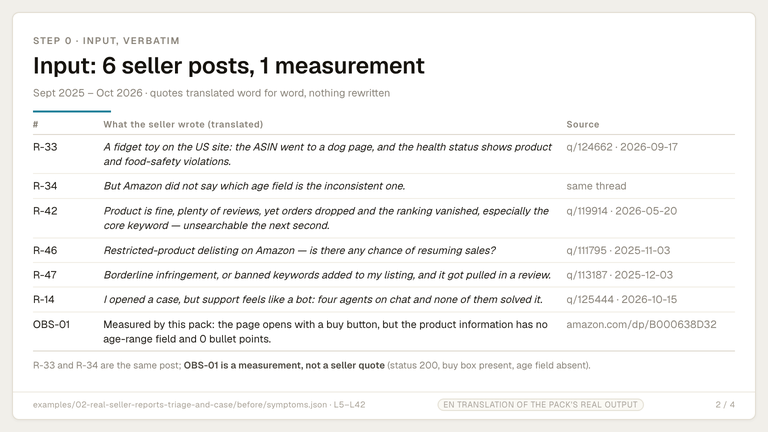
### 3.1 Step 1: symptom triage | Item | Content | |---|---| | Input | `symptoms.json`: the seller's own words (verbatim) plus signals you can actually measure (detail-page status, core keyword visibility, whether a Seller Central notice exists) | | Command | `python3 $PACK/skills/listing-delisting-triage/scripts/triage.py symptoms.json -o out/triage` | | Intermediate | `out/triage-triage.csv` (one row per symptom × candidate category) | | Output | `out/triage-triage.md` (triage table), `out/triage-5day-plan.md` (5-day timeline) | | Acceptance | `triage-triage.csv` row count =
What is inside (file groups)
- listing-delisting-triage — delisting symptom triage
- listing-sensitive-scan — sensitive word and violating claim scan
- listing-field-audit — category / age / compliance field audit
- listing-case-writer — case opening / review appeal wording
- product-title-cleaner — Product title cleaner
Requires
Changelog
v0.1.0
2026-10-24
Listed per the manifest.json inside the pack
How to buy: one pack or a subscription
Just this pack: ¥19.9 once, yours forever, future versions included.
Monthly
¥19.9/mo
The price of one standard pack: a single month gets you all 13 paid packs
Yearly
¥99/yr
Buying the 13 packs separately costs ¥149.7; the yearly plan is cheaper and includes anything released during the term
Lifetime
¥199/one-time
About ten months of subscription, then permanent updates with no renewal
About this skill (full text)
When an ASIN goes to the dog page, core keywords stop surfacing, a restricted-product review lands, or the age field does not match, four skills run in order — triage → scan the copy → check the fields → fix the title → write the case — and produce a triage table, a hit table, a field checklist and an English appeal draft, with no promise of reinstatement anywhere in the process.